 Watch Warp in action.
 Watch how Warp live previews work.
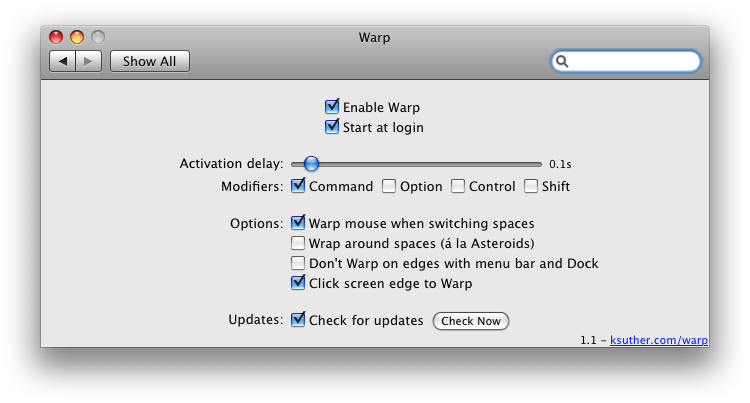 Warp preference pane.
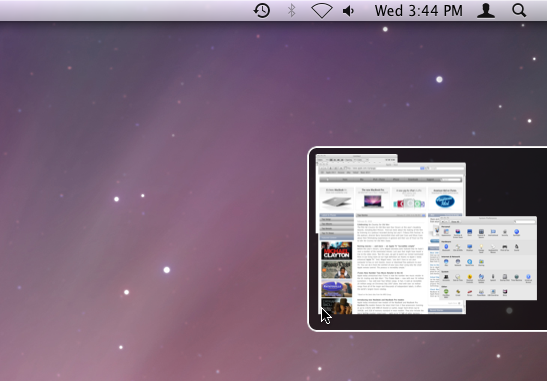 Warp's click-to-warp preview.

Warp is no longer under active development and does not work with any versions of OS X later than Snow Leopard (10.6).
You can still download Warp here.
Warp's source code is also available on GitHub.
Warp is a preference pane that allows you to use the mouse to switch between Spaces rather than using the keyboard.
Warp offers the ability to display a live preview of a space when you move the mouse to the edge of the screen, allowing you to see what you have on another space before actually switching to it. Clicking the preview will then warp you to that space. (Enable this feature by checking the option "Click screen edge to Warp" in Warp's preference pane)
Warp works with Mac OS X 10.5 Leopard and Mac OS X 10.6 Snow Leopard.
If you installed Warp for a single user, go to the folder ~/Library/PreferencePanes (~ indicates your home folder) in the Finder and remove the file Warp.prefPane.
If Warp is installed for all users, Warp will be installed in /Library/PreferencePanes.
Warp is currently localized to these languages:
Shortcut Recorder - Portions of this software copyright (c) 2006, contributors to ShortcutRecorder. All rights reserved.
Watch Warp in action.
Watch how Warp live previews work.
Warp preference pane.
Warp's click-to-warp preview.